RSVP form
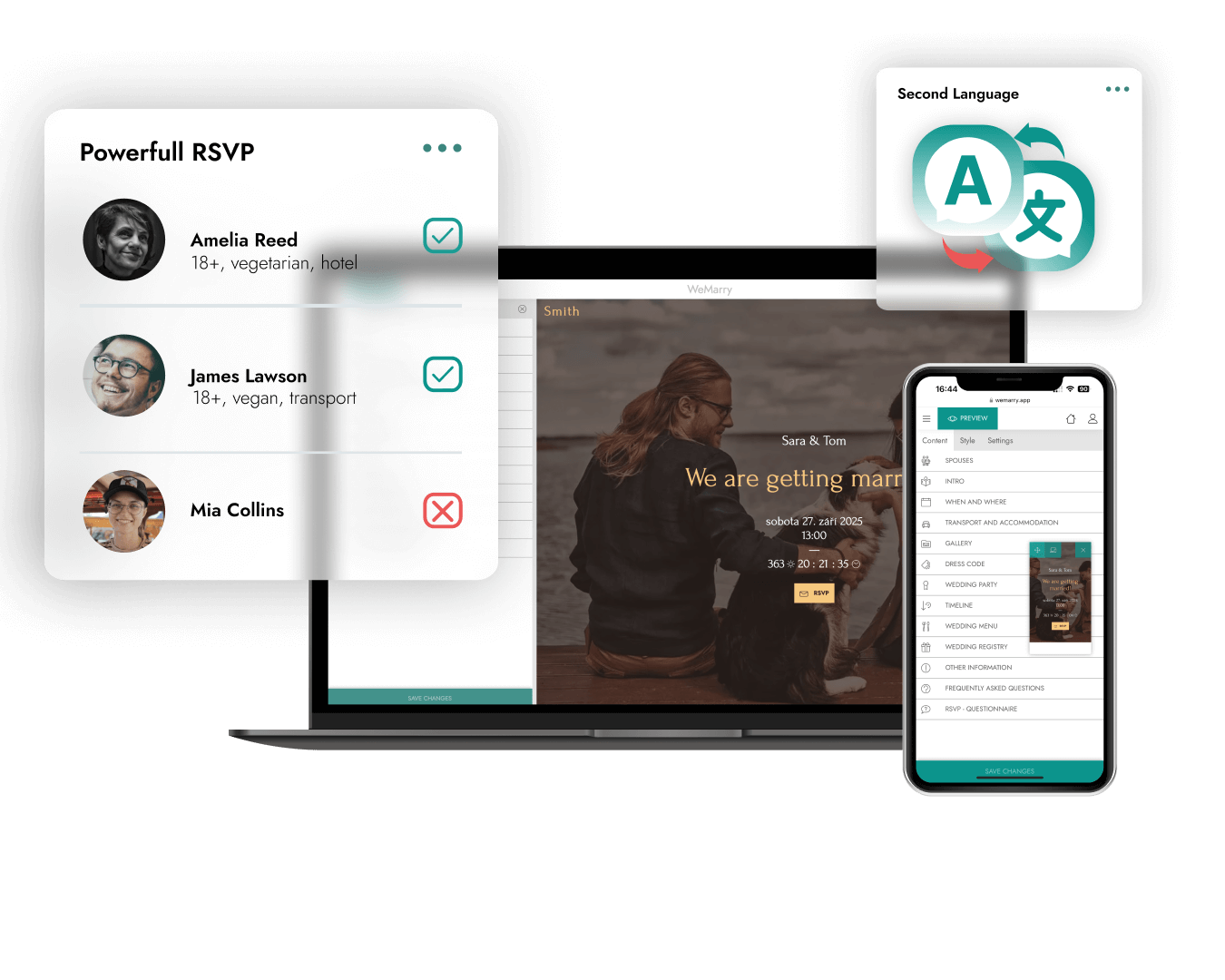
Guests confirm in one click and add dietary needs, accommodation or a song for the DJ. The answers collect themselves and you see them in an overview.
Wedding website
Your own wedding website where guests find the programme, the venue, the dress code and gift ideas, and confirm in one click. You build it for free with no technical knowledge and only pay to publish.
As featured in






What it is
A wedding website is the web page of your wedding. At one address it tells guests everything they need to know: when and where you marry, how the day runs, where to stay, what to wear and what would make you happy. On top of that it collects the answers for you: who is coming, with whom and what they will eat.
It does not replace a printed invitation, it completes it. The card only needs your names, the date, the venue and a QR code or a short link. Anything that changes during the preparations you update on the site, and guests always see the current version.
If you are marrying with just your witnesses or a handful of your closest people and can tell everyone everything at one table, a website will not save you much. It pays off from roughly thirty guests, for a wedding with an overnight stay, with guests from abroad, or when guests travel from all over and need to know where to go and how.
What the wedding website does
A WeMarry wedding website is not just a business card. It is the hub of your preparations and a helper on the day, connected to your guest list and the whole planner.
Guests confirm in one click and add dietary needs, accommodation or a song for the DJ. The answers collect themselves and you see them in an overview.
Fill the site in a second language too, English for example. Guests from abroad switch languages themselves, in every plan.
An address like novakovi.cz instead of a long link, from the Medium plan. It looks good on the invitation and is easy to remember.
Three designer templates to choose from. Pick a style, add your photos and content. Done. You can switch templates any time, even after publishing.
The programme, the ceremony and reception venues with a map, accommodation, dress code, menu and gift ideas. Guests find it all at one address.
Guests from the RSVP form flow into your guest list and seating chart by themselves. No copying from one spreadsheet to another.
Website content
A wedding website is a practical helper first, not a work of art. These are the sections guests ask about most, roughly in the order they read them, each with a short tip from the thousands of weddings planned on WeMarry.
The opening has two jobs: to show guests they are on the right site and to give them the date. Your names, the date, the venue and one photo of you are enough. The template adds the countdown itself.
The exact address, a map and the time guests should arrive, not when the ceremony starts. If the ceremony and reception are in two places, say how to get between them.
An hour-by-hour schedule: ceremony, congratulations, photos, lunch, first dance, cake and the evening party. Guests know when they can leave for the kids and what they must not miss.
Where to park, whether there is a bus or shuttle and until what time. For a wedding outside town, it is question number one.
Where guests can stay, how much it costs and when to book by. If you have rooms reserved for guests, give the code or the reception contact.
Be specific. Instead of “formal”, try “suit, knee-length dress, the garden calls for shoes without stilettos”. Colours guests should avoid belong here too.
Do not be shy about saying what would make you happy. A gift list guests can reserve, or a QR code for a honeymoon contribution, saves a lot of awkward questions.
A form with a clear deadline. Ask only what you really need: number of people, children, food and allergies, accommodation and transport.
A phone number for the best man or the coordinator in case someone gets lost on the day. Keep your own number to yourselves, you will not be answering it.
How you met, who your witnesses and bridesmaids are. Not essential, but guests love reading it and it helps both families get to know each other before the day.
Feel free to copy them and make them your own.
Dear friends and family, we are getting married! We would love you to share this day with us. You will find everything you need to know on this site, and we kindly ask you to RSVP by 31 May.
Your presence is the greatest gift. If you would still like to give us something, a contribution to our honeymoon would make us very happy. You will find a QR code below. Thank you!
Please let us know by 31 May whether you can make it. It helps us plan the food, the seating and the accommodation. You can change your answer any time before the deadline.
Practical features keep your wedding running smoothly and stress-free. The app then collects your guests’ attendance answers automatically.
How it goes
Sign up for free and choose the template that fits the style of your wedding.
Names, the date, the venue, the programme and photos. You put the site together in minutes, even on your phone, with no technical knowledge.
Publish the site, send the link or a QR code with your invitation and guest replies start collecting themselves.
Comparison
There are several ways to build a wedding website. Here is a fair comparison so you can choose by how much time you have and what you expect from the site.
A builder gives you the most freedom in design and a custom site is one of a kind. But if you mainly want a clear view of your guests with as little work as possible, a WeMarry wedding website is the fastest way.
When
Create the site as soon as you know the date and venue. You can send the link with your save the date and add content gradually.
Send the invitations with a link or QR code to the site and open the RSVP form.
The RSVP deadline. Send a reminder to anyone who has not answered, then finish the seating chart, menu and accommodation from the replies.
Add the last details: parking, the programme by the hour and a contact for the best man.
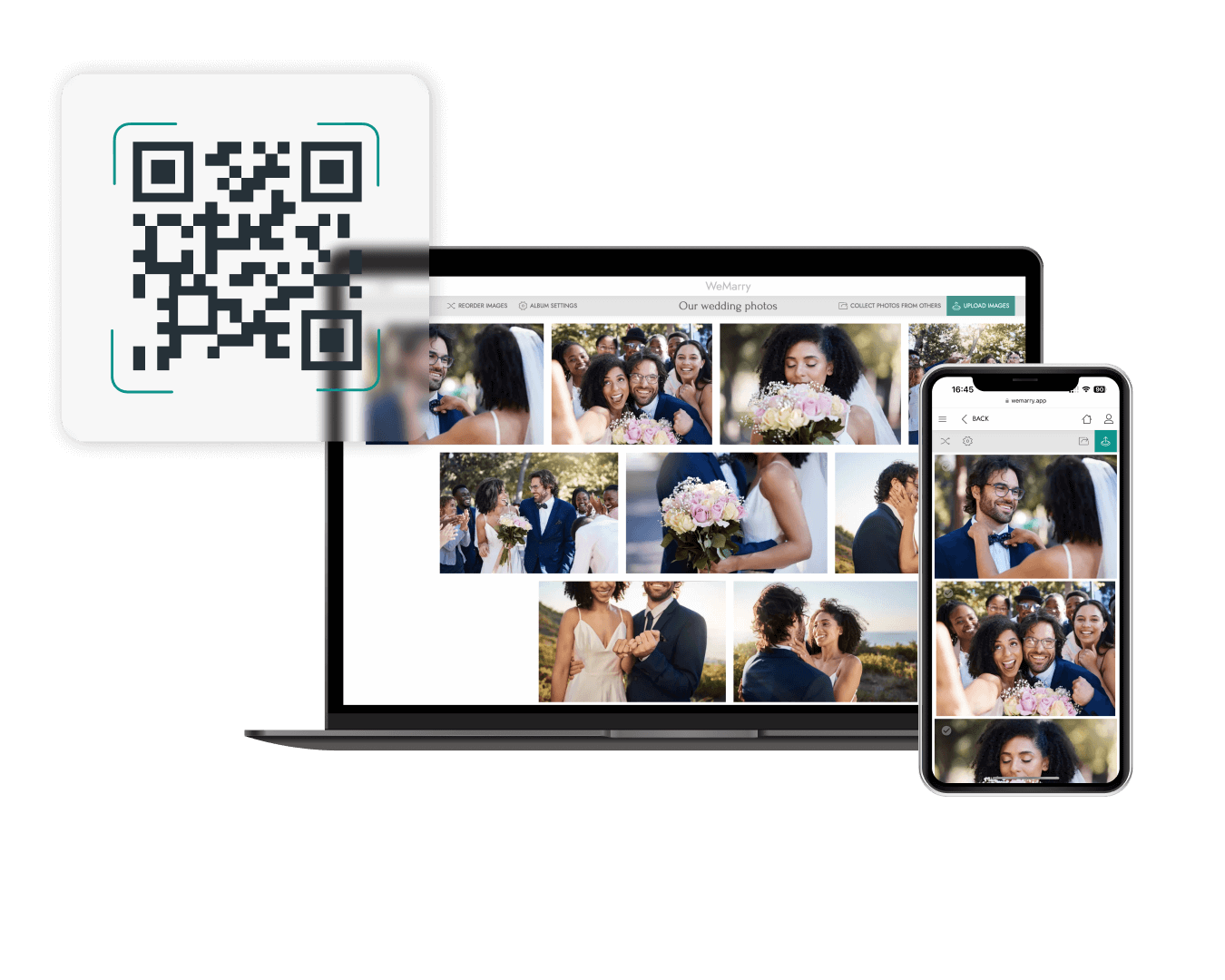
The site turns into a gallery. Guests upload photos through the QR code on the tables, straight from their phones.
Add the photographer's photos and a thank-you to your guests. The site stays online for 12 months after the wedding.
Shared gallery
Guests upload their shots with a QR code straight from their phones, and you add the professional photos to the same gallery later. All at one address, available any time, anywhere.
Pricing
Building the site and the whole planner are free. You pay once, only when you publish the site for your guests. No monthly fees.
An information site for your guests.
Your website with guest RSVP.
Website, RSVP and photo collection from guests.
Free even without a plan: task checklist · budget · vendor directory · wedding-day schedule. On every plan the site stays online for 12 months after the wedding.
30-day guarantee
Money back, no questions asked
Over 2,000 couples
have used WeMarry
4.7 ★ on Google
Rated by happy couples
With the wedding website you also get the seating chart , online wedding invitations , wedding checklist and budget tracker .
Frequently asked questions
You sign up for free, pick a template, add your names, the date, the venue and photos, then send your guests the link. Most couples have the site finished in one evening, with no technical knowledge at all.
Building, previewing and editing the site are free, and so is the whole planner with the checklist and budget. You only pay when you publish the site for your guests.
You pay once, only when you publish the site for your guests: Lite €39, Medium €59, Premium €79. No monthly fees. Lite publishes an information site, Medium adds RSVP, email invitations, the seating chart, automatic translation into another language and your own domain, and Premium also collects photos from guests through a QR code.
12 months after the wedding, on every plan. Guests can come back for the photos and your thank-you long after it. Then the site and its data are deleted automatically; we send you an e-mail 30 and 7 days before.
Yes. In every plan you can fill the site in a second language too, English for example. Guests switch languages themselves.
Yes, from the Medium plan. You buy a domain such as novakovi.cz from a registrar and WeMarry shows you how to connect it. With Lite you get an address on a WeMarry subdomain.
Couples' wedding websites are not in search engines, so nobody stumbles on them by chance. Only the people you send the address to know it.
Ideally as soon as you know the date and venue, so 6 to 12 months ahead. You can fill it in gradually and guests always see the current version.
Yes. You change the template, colours and content any time, even after sending the link to guests. The address stays the same.
Yes. The templates are designed mobile first, because that is where guests open the site most often, on the way to the ceremony for example.
No. If you can handle email, you can handle a wedding website. Everything is simple, with no coding.
Start planning
Start planning the wedding you want, today. Free to sign up, no credit card, no commitment. Everything in one place.
No credit card · Planner free · You pay only when you publish


